This blog explains/shares features, development experience & Interesting features of Java/J2EE technologies.
Saturday, July 6, 2013
Friday, July 5, 2013
Multi threading example using Java
Multi Threading example in java
It is very common requirement to implement multi threading in large scale applications to improve the throughput of response,
Below screenshot demonstrates how to crate a thread, and process the given List of values
Below java class demonstrates, how to perform multi threading.
It is very common requirement to implement multi threading in large scale applications to improve the throughput of response,
Below screenshot demonstrates how to crate a thread, and process the given List of values
Below java class demonstrates, how to perform multi threading.
Monday, July 1, 2013
Thursday, June 27, 2013
Hello World Application using Struts 2.1
- Create a Java Project & Add Struts Capabilities to the project.
- Develop index.jsp as shown below, Ensure form action value will be used in struts.xml
- Ensure web.xml should be as shown below
- Define welcome.jsp with whatever you want to display.
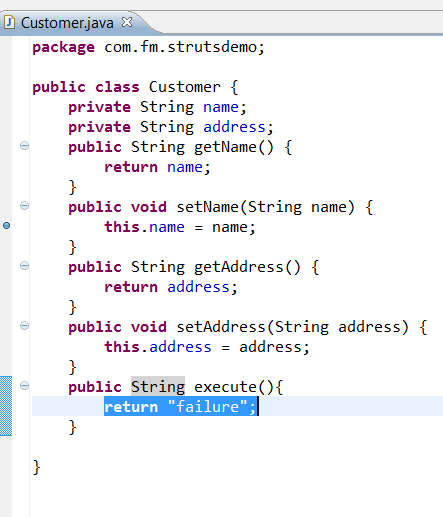
- Develop a Customer.java POJO class as shown below, Ensure this should have a method called execute() , Struts framework will invoke execute() method internally.. This method can return any string value based on functional requirement.
- Modify struts.xml as shown below
- Configure action element as shown below
- Add as many result elements as you want based on execute() method return values.. If execute() method returns "success" , "failure" depends on two conditions, then define two result elements as shown below.
- Run this application , Right click on project, Run As ->MyEclipse Server Application
- By default, it will launch index.jsp
- By clicking on 'Submit' button , this will invoke form action and navigate to based on execute() method return value.
Wednesday, June 26, 2013
Hello World Example With Spring Framework
- Create a Java Project in My Eclipse, Add 'Spring3.1' Capabilities, By right clicking on Project->MyEclipse->Project Facets(Capabilities)->Spriing Facet
This will load required libraries in the class path.
- Create a Customer POJO as shown below, with one parameterized constructor and to data members
- Update applicationContext.xml as shown below by configuring the bean details.
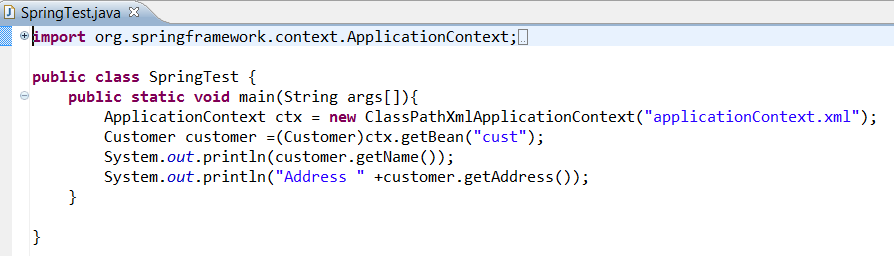
- Write a simple Test class as shown below, Right click on this class and run as java application
Monday, June 17, 2013
Deployment issue while deploying from Jdeveloper to Weblogic Console : Deployer:149140
If you encounter below deployment issue while deploying from Jdev to Weblogic console,
Ensure you activated the changes in weblogic console.
[12:03:14 PM] [Deployer:149140]The task cannot be processed further until the current edit session is activated. When this occurs, task processing will continue. The user can exit the deployer tool without affecting the task.
If you encounter below deployment issue while deploying from Jdev to Weblogic console,
Ensure you activated the changes in weblogic console.
[12:03:14 PM] [Deployer:149140]The task cannot be processed further until the current edit session is activated. When this occurs, task processing will continue. The user can exit the deployer tool without affecting the task.
Wednesday, June 12, 2013
How to Convert org.apache.myfaces.trinidad.model.UploadedFile to java.io.File
Convert org.apache.myfaces.trinidad.model.UploadedFile to java.io.File
// assume that you have the UploadedFile object named uploadFile
InputStreamReader reader = new InputStreamReader(uploadFile.getInputStream());
int partition = 1024;
int position = 0;
int length = 0;
char[] buffer = new char[partition];
FileWriter fstream = new FileWriter("test.tmp");
do{
length = reader.read(buffer, position, partition)
fstream.write(buffer, position, length);
}while(length > 0);
File file = new File("test.tmp");
/**
* Read the attached file content as a byte[] and convert to Datahandler
* @param valueChangeEvent
*/
public void onFileUpload(ValueChangeEvent valueChangeEvent) {
String methodName = "onFileUpload(ValueChangeEvent)";
_logger.entering(CLAZZ_NAME, methodName);
try {
UploadedFile file = (UploadedFile)valueChangeEvent.getNewValue();
byte[] byteArray=org.apache.commons.io.IOUtils.toByteArray(file.getInputStream());
DataHandler dataHandler = new DataHandler(byteArray,"application/octet-stream");
} catch (Exception b64de) {
_logger.logp(Level.SEVERE, CLAZZ_NAME, methodName,
" Exception Occured", b64de);
b64de.printStackTrace();
}
_logger.exiting(CLAZZ_NAME, methodName);
}
Subscribe to:
Posts (Atom)